
Choosing the right Learning Management System

Choosing the right learning management system starts with understanding your learners, content and delivery requirements. The best platform is not necessarily the biggest or the one with the most features. It is the one that supports how your organisation needs to deliver, manage and track learning.


A Learning Management System (LMS) helps organisations manage online and blended learning. Depending on the platform, it may support enrolments, course access, learner progress, assessments, reporting, certificates and compliance records.


With so many options available, choosing an LMS can feel overwhelming. The key is to start with what the system needs to achieve rather than comparing lengthy feature lists.

Learning management system options for organisations

WHAT IS A LEARNING MANAGEMENT SYSTEM?

An LMS is a platform used to deliver and manage online learning. Depending on the system, it may allow you to: 

  • enrol learners.  
  • host eLearning modules, videos, documents, and activities.  
  • track progress and completion.  
  • assess learning outcomes.  
  • issue certificates.  
  • manage reporting.  
  • support communication between learners, trainers, and administrators.  

Some LMS platforms are built for education providers. Others are designed for workplace training, customer education, membership programs, or selling courses online. 


COMMON LEARNING MANAGEMENT SYSTEM TYPES

Hosted learning management systems

A hosted or cloud-based LMS is managed by a provider and accessed through the internet. This can reduce the organisation’s technical workload because hosting, infrastructure and system updates are generally managed as part of the service. Canvas and TalentLMS are examples of hosted platforms used to deliver and manage online learning.

Open-source learning management systems

Open-source platforms provide access to their source code, allowing organisations greater control over configuration and customisation. Moodle is a widely used example that can support education, workplace training, blended delivery and self-paced learning. However, organisations still need to decide whether to manage the hosting themselves or use a hosting provider.

Website-based learning management systems

Some organisations need a simple way to create and sell courses rather than a full learning management system. Platforms such as Squarespace Courses can host structured course content and provide progress tracking and payment options through an existing website. However, they may not provide the reporting, compliance or administration functions of a dedicated LMS.

Website plugin learning management systems

Organisations with a WordPress website can add learning functionality through plugins such as LearnDash or Tutor LMS. These tools can support course creation, quizzes, progress tracking and ecommerce. The organisation remains responsible for its WordPress hosting, plugin compatibility, updates, security and ongoing maintenance.

OUR TOP TIPS

Start with your learning needs

Before comparing platforms, define what you need the LMS to support. Do you need compliance tracking, formal assessments, certificates, blended learning, ecommerce, reporting, or simple course access? A platform that works well for short public courses may not be suitable for complex internal compliance training.

Know your audience

Consider who will use the platform. Learners may be employees, students, volunteers, customers, contractors, or members of the public. Think about their digital confidence, access needs, device use, and whether they will complete learning at work, at home, or on site.

Check the learner experience

An LMS should be easy to navigate. Learners should be able to find courses, understand what they need to complete, track their progress, and access support. If the platform feels confusing, learners may disengage before they even reach the content.

Look at administrator needs

A good LMS must also work for the people managing it. Consider how easy it is to enrol learners, assign courses, pull reports, update content, manage groups, and troubleshoot access issues.

Think about reporting and compliance

If training is linked to compliance, induction, accreditation, or professional development, reporting is critical. Check whether the LMS can track completions, assessment results, certificates, refresher dates, and learner progress in the format your organisation needs.

Consider content compatibility

If you already have eLearning modules, check whether the LMS supports the file types you use, such as SCORM packages, videos, documents, quizzes, or embedded resources. Not every platform handles externally developed learning content in the same way.

Check accessibility

Review keyboard access, screen reader compatibility, colour contrast, captioning options and the accessibility of learner and administrator interfaces. Accessibility should be evaluated through testing rather than relying only on a vendor statement.

Review security and integrations

Identify what learner information the system will store and how it will connect with your existing technology. Consider privacy, data location, user permissions, single sign-on and integrations with HR, student management, ecommerce or reporting systems.

Plan for growth

Choose a platform that can grow with your organisation. Consider future learner numbers, course volume, audience groups, branding, integrations and reporting requirements. You should also understand how easily your courses, learner records and completion data can be exported if your needs change.

Review support and maintenance

Ask what support is available, how updates are managed, and what happens if something breaks. A low-cost platform can become expensive if your team spends significant time solving technical issues.

Balance cost with value

Cost is not just the subscription fee. Consider setup, migration, training, administration, integrations, customisation, support, and ongoing maintenance. The cheapest option is not always the most cost-effective.


BENEFITS OF AN LMS

A well-chosen LMS can help organisations: 

  • deliver consistent learning at scale.  
  • reduce manual administration.  
  • track learner progress and completions.  
  • support compliance and audit requirements.  
  • provide learners with flexible access.  
  • create a central home for learning resources.  
  • manage refresher training and ongoing development.  

Choosing an LMS is not about finding the platform with the most features. It is about selecting a system that supports your learning goals, learners, administrators, content and reporting requirements.

Instructure. (n.d.). Canvas: World-leading LMS for teaching and learning. https://www.instructure.com/en-au/canvas

LearnDash. (n.d.). LearnDash: WordPress LMS plugin and course software. https://www.learndash.com/

Moodle. (n.d.). Open-source online learning. https://moodle.com/about/open-source/

Squarespace. (n.d.). Create engaging online courses. https://www.squarespace.com/ecommerce/online-courses

TalentLMS. (n.d.). TalentLMS: Cloud LMS software for online learning. https://www.talentlms.com/

Tutor LMS. (n.d.). Tutor LMS: WordPress LMS plugin. https://tutorlms.com/
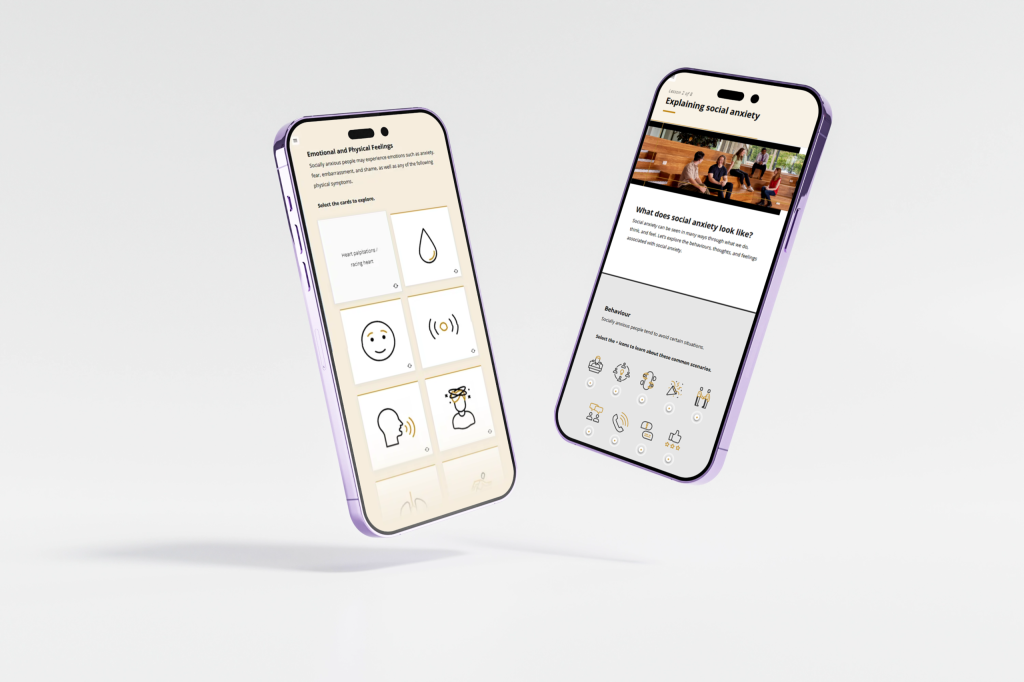
Designing for distracted learners

Designing for the distracted learner requires a clear understanding of how competing demands affect attention during online learning. When content is easy to navigate, relevant and well structured, learners are more likely to remain engaged and retain key information.


In today’s digital world, learners are often juggling emails, notifications and other priorities while completing online courses. Even well-designed content can be overlooked when attention is divided. The solution is not to make learning more flashy, but to reduce unnecessary distractions, highlight what matters and support sustained focus.

Our top tips

Chunk your content

Break content into small, manageable segments (5–10 minutes). This reduces cognitive load and allows learners to process information in short bursts, which increases retention (Sweller, 2011). For example, instead of a 45-minute course on workplace safety, deliver three 10-minute modules: hazard identification, reporting procedures, and emergency response.

Prioritise clarity and relevance

Highlight key points and relate them directly to learners’ work or experiences. Learners are more likely to pay attention if they see immediate value (Mayer, 2017). For example, in a customer service course, start each module with a realistic scenario that learners could encounter in their role.

Use multimedia thoughtfully

Combine visuals, audio, and text to reinforce key messages, but avoid unnecessary animations or effects that may distract (Fiorella & Mayer, 2018). For example, show a simple diagram while narrating a process instead of adding multiple animated effects.

Include interactive elements

Engage learners actively through quizzes, drag-and-drop exercises, or scenario choices. Interaction encourages focus and helps prevent passive scrolling. For example, after a module on compliance, include a short scenario-based quiz asking learners to choose the correct course of action.

Apply signalling and visual cues

Use highlights, bolding, arrows, or callouts to direct attention to critical information. This helps guide learners’ eyes to the most important content, even when their attention is divided. For example, in a data security module, bold or highlight “Do not share passwords” alongside a padlock icon.

Keep navigation consistent

Predictable, clearly labelled navigation reduces cognitive load, letting learners focus on content rather than figuring out how to move through it (Clark & Mayer, 2011). For example, keep “Next” and “Back” buttons in the same location on every screen, and use consistent iconography for quizzes and activities.

Encourage reflection and active recall

Even brief reflection or retrieval practice helps learners retain information, especially in fragmented attention environments (Roediger & Butler, 2011). For example, ask learners to spend 30 seconds writing down the three key steps from a safety module before moving on.

Designing for the distracted learner means structuring, highlighting, and engaging learners so they can focus on what matters most, even in a busy digital environment. 

Clark, R. C., & Mayer, R. E. (2011). E-learning and the science of instruction: Proven guidelines for consumers and designers of multimedia learning (3rd ed.). Pfeiffer. https://doi.org/10.1002/9781118255971

Fiorella, L., & Mayer, R. E. (2018). What works and doesn’t work with instructional video. Computers in Human Behavior, 89, 465–470. https://doi.org/10.1016/j.chb.2018.07.015

Mayer, R. E. (2017). Using multimedia for e-learning. Journal of Computer Assisted Learning, 33(5), 403–423. https://doi.org/10.1111/jcal.12197

Roediger, H. L., III, & Butler, A. C. (2011). The critical role of retrieval practice in long-term retention. Trends in Cognitive Sciences, 15(1), 20–27. https://doi.org/10.1016/j.tics.2010.09.003

Sweller, J. (2011). Cognitive load theory. Psychology of Learning and Motivation, 55, 37–76. https://doi.org/10.1016/B978-0-12-387691-1.00002-8

Workflow learning for employee support

Workflow learning delivers support at the moment of need through short tools, quick reminders, or targeted microlearning that helps learners act immediately, not just understand concepts. 


Workflow learning delivers support at the moment of need through short tools, quick reminders or targeted microlearning that helps learners act immediately, not just understand concepts.

When is workflow learning suitable?

Workflow learning works best when employees need to recall steps, make routine decisions or complete tasks that occur infrequently. It can also reinforce earlier training by helping learners apply knowledge in practice.


However, it should not replace formal learning where people need to develop complex skills, practise judgement, explore consequences or demonstrate competence before performing a task independently. In these cases, structured training can build the required foundation, while workflow resources provide ongoing support afterwards.

Our top tips

Provide job-embedded resources

Create short guides, checklists and micro-videos learners can access while performing a task. Focus each resource on a specific action, decision or common point of difficulty. Make sure the information is easy to scan so learners can find what they need without interrupting their work for long.

Use push notifications or reminders through an LMS or intranet

Send timely prompts through a Learning Management System (LMS), intranet or workplace platform. Nudges can reinforce key steps, prompt follow-up actions and help learners apply knowledge after formal training. They are most effective when they are relevant, well timed and linked to an action the learner needs to complete.

Integrate learning into digital workflows

Embed short learning moments into the systems and tools employees already use. This reduces disruption and makes support easier to find at the point of need. Examples include help text, process prompts, short demonstrations or links to guidance within a digital system.

Design for mobile

Make resources easy to access and use on smaller screens. Mobile-friendly content is particularly valuable for frontline, field-based or travelling employees. Use short sections, clear headings and simple navigation so learners can retrieve information quickly in different working environments.

Use repetition and spacing

Provide follow-up activities or reminders over time rather than relying on a single learning event. Repeated retrieval helps strengthen recall and encourages ongoing application. Spaced prompts can also direct learners back to key information before knowledge is forgotten or a task is repeated.

Keep everything short and purposeful

Include only the information learners need to complete the immediate task. Use clear headings, direct instructions and formats that can be scanned quickly. Each resource should have a clear purpose and avoid background information that does not support the learner’s next action.

Workflow learning focuses on application, not just awareness. The goal is to support performance at the exact moment learners need help. 

Bersin, J. (2018, June 3). A new paradigm for corporate training: Learning in the flow of work. Josh Bersin.

Brown, P. C., Roediger, H. L., III, & McDaniel, M. A. (2014). Make it stick: The science of successful learning. Harvard University Press. https://doi.org/10.4159/9780674419377

Clark, R. C., & Mayer, R. E. (2011). E-learning and the science of instruction: Proven guidelines for consumers and designers of multimedia learning (3rd ed.). Pfeiffer.

Online soft skills training that connects

Online soft skills training plays an essential role in developing capabilities such as communication, leadership, empathy, and decision-making. While these skills can be challenging to teach in a digital environment, thoughtful learning design can build genuine behavioural capability.


Research suggests that conversational language and human-centred design can improve learner engagement and make online soft skills training more meaningful.

Our top tips

Use realistic scenarios

Soft skills are context dependent. Scenarios allow learners to practise difficult conversations, ethical decisions, or leadership challenges in a safe environment. Providing realistic scenarios means that online soft skills training is contextualised and relevant to the role and workplace. 

Add reflection prompts

Reflection builds self-awareness and improves the transfer of learning into workplace action. Encourage learners to relate scenarios to their own experiences, consider how they would respond in similar situations, and identify practical ways to apply their learning in the workplace.

Include modelling

Online soft skills training benefits from short videos, worked examples, and demonstration dialogues that model effective communication, leadership, and interpersonal behaviours. Seeing these skills in action helps learners understand not only what to do, but how to apply those behaviours confidently in real workplace situations.

Build practice opportunities

Use the technology available to maximise engagement opportunities in online soft skills training. Branching scenarios, multiple choice questions, and role-based activities and challenges encourage application that goes beyond simply understanding.

Reinforce over time

Soft skills develop gradually. Use spaced repetition, performance supports (e.g. FAQs, procedures, intranet resources), reminders, or follow-up tasks to support long-term growth. This can tie in with the practice opportunities by giving learners a workplace task to complete between learning activities.

Keep feedback specific and constructive

Provide clear guidance on how learners’ choices impact relationships, outcomes, and team dynamics. Feedback should explain why an approach is effective, reinforce positive behaviours, and offer practical suggestions for improving future interactions.

Online soft skills training requires practice, reflection, and modelling. With intentional design, online learning can provide all three. 

Brown, P. C., Roediger, H. L., & McDaniel, M. A. (2014). Make it stick. Harvard University Press. 

Clark, R. C., & Mayer, R. E. (2011). E-Learning and the science of instruction. Pfeiffer. 

Hattie, J., & Clarke, S. (2019). Visible learning: Feedback. Routledge.

Mayer RE, Fiorella L, eds. Principles for Reducing Extraneous Processing in Multimedia Learning. In: The Cambridge Handbook of Multimedia Learning. Cambridge Handbooks in Psychology. Cambridge University Press; 2021:183-240. 

Blended learning that engages

Blended learning works best when each component does what it’s uniquely good at. Workshops, coaching, and live sessions provide interaction and depth. Online learning provides flexibility, consistency, and structured practice. When blended well, the two reinforce each other to improve engagement, retention, and transfer. 


Blended learning is most effective when online and facilitated learning are intentionally integrated, with each delivery mode supporting different learning outcomes

Our top tips

Use digital learning for preparation, not duplication

Pre-work should give learners the foundations so valuable workshop time is not spent on information delivery. Use online modules for definitions, models, examples, and foundational skills.

Build online practice into blended learning

Use quizzes, scenarios, reflection prompts, and short activities to reinforce ideas before and after live sessions. Spaced reinforcement improves long-term retention.

Connect Online learning modules to the live experience

Start each online component with a short sentence that explains how it supports the workshop or coaching session. This improves relevance and motivation.

Keep online content short and focused

Microlearning pieces are easier for busy learners to complete ahead of a session. Shorter activities also reduce cognitive load.

Provide clear transition points

Use signposting like “Before our workshop…” or “After the live session…” to guide learners through the journey.

Use real scenarios in blended learning to bridge the two modes

Online scenarios give learners a safe space to practise decisions, while workshops allow them to discuss complexity. Together, they build capability.

Blended learning succeeds when each mode is intentional. By using online tools to prepare, reinforce, and extend learning, you create a program that supports sustained capability. 

Clark, R. C., & Mayer, R. E. (2011). E-Learning and the science of instruction. Pfeiffer. 

Graham, C. R., & Halverson, L. R. (2022). Blended learning research and practice. In Handbook of open, distance and digital education. Springer. https://doi.org/10.1007/978-981-19-0351-9_68-1

Mayer, R. E. (2017). Using multimedia for e-learning. Journal of Computer Assisted Learning, 33(5), 403–423. https://doi.org/10.1111/jcal.12197 

Roediger, H. L., III, & Butler, A. C. (2011). The critical role of retrieval practice in long-term retention. Trends in Cognitive Sciences, 15(1), 20–27. https://doi.org/10.1016/j.tics.2010.09.003

Learning transfer that lasts

Too often, eLearning ends at completion. But the real payoff comes when learning transfers into changed practice or behaviour. If training doesn’t influence day-to-day work, it risks being a checkbox. Designing for transfer ensures learning has real-world impact. 


Transfer is the process where newly learned knowledge or skills are applied in the workplace, and it directly impacts return on investment. Without it, learning may improve knowledge but not performance, reducing long-term value. 

Our top tips

Define clear, applicable learning outcomes

Design learning around real tasks or decisions learners encounter. Start by asking “What will the learner do differently after this course?”

Use real-world scenarios and context

Embed workplace-relevant scenarios and case studies so learners can see how concepts translate into day-to-day practice.

Include opportunities for practice and reflection

After instruction, give learners tasks, simulations or prompts to apply learning, ideally in conditions resembling real work. Include reflection or self-explanation: asking learners to articulate why and how they’d apply learning improves transfer.

Use varied and spaced practice

Avoid one-off events. Spread learning, practice, and reinforcement over time, and vary the contexts in which learners apply it. Mixed practice helps learners generalise skills more effectively.

Support a transfer-friendly environment

Learning transfer depends on the workplace. Encourage managers to support application, set goals post-training, and create opportunities to use new skills. Build in follow-up mechanisms and embedding of learning outcomes into workflows.

Measure beyond completion

Don’t just track course completion or quiz scores, but also collect data on whether learners apply learning on the job, change their behaviour, or meet performance outcomes. This helps evaluate and strengthen transfer over time.

Designing courses that learners complete is just step one. Learning only delivers value when it changes behaviour, decisions or performance. By designing for transfer, you’re helping organisations get real value from their training investments and helping learners turn knowledge into action. 

Cepeda, N. J., Pashler, H., Vul, E., Wixted, J. T., & Rohrer, D. (2006). Distributed practice in verbal recall tasks: A review and quantitative synthesis. Psychological Bulletin, 132(3), 354–380. https://doi.org/10.1037/0033-2909.132.3.354 

Foxon, M. (1993). A process approach to the transfer of training. Australian Journal of Educational Technology, 9(2), 130–143. https://doi.org/10.14742/ajet.2104 

Kauffeld, S., Decius, J., & Graßmann, C. (2025). Learning and transfer in organisations: How it works and can be supported. European Journal of Work and Organizational Psychology, 34(2), 161–174. https://doi.org/10.1080/1359432X.2025.2463799

The power of spaced learning

We’ve all crammed before an exam, only to forget most of it days later. The same problem happens in workplace learning when information is delivered once and never revisited, retention drops fast. That’s where spaced learning comes in. By revisiting key ideas over time and prompting learners to actively recall them, you can transform one-off training into lasting knowledge. 

Research consistently shows that spacing learning over time improves long-term retention compared with completing all learning in a single session.

Our top tips

Break content into digestible pieces

Instead of long modules, use short bursts of learning (5–10 minutes). Learners can revisit these later without being overwhelmed, reducing cognitive load. For example, a compliance course could deliver five-minute lessons on individual topics like data privacy, reporting breaches, and secure passwords, rather than a single one-hour module or training session.

Space out review opportunities

Send reminders or follow-up activities days or weeks after initial training. Research shows that optimal spacing strengthens memory by forcing the brain to work a little harder to retrieve information. For example, after a cybersecurity training session, send learners a short follow-up activity two days later that asks them to identify signs of a phishing email.

Use retrieval practice, not just re-reading

Rather than sending learners back to review slides, prompt them with a quiz question, scenario, or reflection. The act of recalling information, even with some struggle, improves retention far more than re-exposure. For example, instead of asking learners to re-read the company’s code of conduct, send them a short quiz with realistic dilemmas (e.g., “What would you do if a supplier offered you a gift?”).

Mix it up with varied practice

Change the context slightly when you revisit content. Variety strengthens application skills. For example, after a policy training, the first follow-up could be a short quiz, the next a scenario, and later a case study. 

Automate reinforcement nudges

Set up your LMS or communication channels to deliver micro-reinforcement automatically short reminders, challenges, or knowledge checks. This keeps learning alive without relying on manual effort. For example, send a weekly email with a one-question scenario or a short video tip that reminds learners of key principles.

Connect spacing to real work

Encourage learners to apply a concept on the job and share back what they did. This reflection acts as spaced reinforcement while embedding knowledge in experience. For example, for a leadership course, prompt learners to apply one coaching technique during their next team meeting, then reflect on the outcome in an online discussion board.

Spaced learning isn’t about adding more content; it’s about delivering the right content at the right time. By combining micro-learning, retrieval practice, and smart scheduling, you’ll help knowledge stick long after the course ends. The key is to align the format with the purpose of your content, and not to assume one is always better than the other. 

Cepeda, N. J., Pashler, H., Vul, E., Wixted, J. T., & Rohrer, D. (2006). Distributed practice in verbal recall tasks: A review and quantitative synthesis. Psychological Bulletin, 132(3), 354–380. https://doi.org/10.1037/0033-2909.132.3.354

Cepeda, N. J., Vul, E., Rohrer, D., Wixted, J. T., & Pashler, H. (2008). Spacing effects in learning: A temporal ridgeline of optimal retention. Psychological Science, 19(11), 1095–1102. https://doi.org/10.1111/j.1467-9280.2008.02209.x

Dunlosky, J., Rawson, K. A., Marsh, E. J., Nathan, M. J., & Willingham, D. T. (2013). Improving students’ learning with effective learning techniques: Promising directions from cognitive and educational psychology. Psychological Science in the Public Interest, 14(1), 4–58. https://doi.org/10.1177/1529100612453266

Kang, S. H. K. (2016). Spaced repetition promotes efficient and effective learning: Policy implications for instruction. Policy Insights from the Behavioral and Brain Sciences, 3(1), 12–19. https://doi.org/10.1177/2372732215624708

Roediger, H. L., III, & Butler, A. C. (2011). The critical role of retrieval practice in long-term retention. Trends in Cognitive Sciences, 15(1), 20–27. https://doi.org/10.1016/j.tics.2010.09.003

Multiple Choice Questions that work

Multiple choice questions (MCQs) are one of the most widely used assessment tools in online learning, but they’re not without limitation. Critics argue they promote surface learning, rely on recall rather than understanding, and fail to measure application.


However, when designed well and used appropriately, MCQs can support knowledge building and provide rapid feedback at scale. 

Where MCQs work

MCQs are best used to:

  • Check recall and recognition of facts or concepts. 
  • Reinforce key learning through immediate feedback. 
  • Support self-assessment in formative contexts. 
  • Gauge understanding of procedures, rules, or terminology.

They are less effective for assessing:

  • Complex reasoning or synthesis. 
  • Practical skills or judgment in context (unless scaffolded with scenarios). 
  • Reflective or creative thinking. 

Research suggests that well-designed multiple choice questions can support learning by encouraging retrieval practice and providing meaningful feedback that helps learners address misconceptions.

Our top tips

Write clear, focused stems

Each question should ask one clear thing. Avoid convoluted wording or irrelevant background detail. Instead of asking, “Which of the following is not uncommon?”, ask, “Which of the following is rare?”

Tell learners what to do

Use instructive language to reduce ambiguity. If a question has more than one correct response, state it clearly: 

“Which two (2) of the following actions improve accessibility?” 

Avoid trick questions

MCQs should challenge learners, not confuse them. Avoid distractors that rely on pedantic detail or obscure exceptions. The goal is to assess understanding, not catch people out.

Use plausible distractors

Each incorrect option should be realistic and based on common errors or misconceptions, not random guesses. If distractors are too easy to dismiss, the question loses value. If they’re too tricky, they obscure learning.

Avoid negatives

Negatively worded questions such as “Which of the following is NOT recommended?” can trip up even knowledgeable learners. If you must include one, highlight the negative term: 

“Which of the following is NOT considered part of the code of conduct?” 

Align the language

The language in questions and responses should reflect the same language used throughout the content so that learners can make the connection. Using consistent terminology allows learners to recognise and apply the language introduced in the content, strengthening retention.  

Use scenarios for context

To assess application, frame MCQs around short scenarios. This supports deeper thinking and moves beyond rote recall: 

“A team member refuses to wear PPE on-site. Which action should you take first?” or include names for personalisation “Maya was working on site and….what should Maya do in this situation?”

Avoid “All of the above” and “None of the above”

These can encourage guessing and reduce the diagnostic value of the question. Instead, list discrete, assessable options.

Align to learning outcomes

Write each question to measure a specific objective or piece of content. Random, unfocused questions dilute the effectiveness of your quiz.

Mix in formative feedback

When possible, provide immediate feedback on why the correct response is right and why others are wrong. This reinforces key points and means that even “lucky guesses” will benefit from some additional context. 

Multiple-choice questions don’t have to be guesswork. When designed well, they can measure understanding and support learning.

Brame, C. J. (2013). Writing good multiple choice test questions. Vanderbilt University Center for Teaching. https://cft.vanderbilt.edu/guides-sub-pages/writing-good-multiple-choice-test-questions/ 

Butler, A. C. (2018). Multiple-choice testing in education: Are the best practices for assessment also good for learning? Journal of Applied Research in Memory and Cognition, 7(3), 323–331. https://doi.org/10.1016/j.jarmac.2018.07.002

Haladyna, T. M., & Downing, S. M. (2004). Construct-irrelevant variance in high-stakes testing. Educational Measurement: Issues and Practice, 23(1), 17–27. https://doi.org/10.1111/j.1745-3992.2004.tb00149.x 

Moreno, R., & Mayer, R. E. (2007). Interactive multimodal learning environments. Educational Psychology Review, 19(3), 309–326. https://doi.org/10.1007/s10648-007-9047-2 

Storytelling that brings learning to life

Facts and bullet points can convey information, but stories make content stick. Storytelling in learning builds connection, context, and meaning.  It anchors abstract or complex ideas in relatable narratives, helping learners understand and remember.


In educational settings, storytelling has been shown to support understanding, retention, and transfer of learning. Learning through story can lead to deeper comprehension and improved application of concepts. 

Our top tips

Start with a relatable context or problem

Build your learning around a scenario that reflects real-life challenges or decisions learners face. This grounds learning in relevance.

Give the learner a narrative role (protagonist, investigator, decision-maker)

Position learners as central actors in a story. For example, frame a compliance course as a scenario where the learner must navigate a tricky ethical decision and make choices.

Use conflict and resolution to drive engagement

Introduce a problem or dilemma that requires applying learning to solve it. This structure creates motivation, emotional engagement, and deepens meaning. 

Include characters or relatable personas

Using personas or characters helps learners see themselves in the story. It humanises content and helps learners connect emotionally and cognitively.

Use multimedia storytelling where helpful

Combine visuals, narration, and interaction to reinforce story elements. Visuals especially help make abstract ideas tangible and memorable.

When done well, storytelling strengthens engagement, supports understanding, and helps learners retain and apply knowledge. It transforms courses from static information dumps into meaningful experiences. 

Andrews, D. H., Hull, T. D., & Donahue, J. A. (2009). Storytelling as an instructional method: Definitions and research questions. Interdisciplinary Journal of Problem-Based Learning, 3(2), 6–23. https://doi.org/10.7771/1541-5015.1063

Harvard Business Publishing. (2019). What makes storytelling so effective for learning? https://www.harvardbusiness.org/insight/what-makes-storytelling-so-effective-for-learning/ 

Lee, K et al. (2023). Storytelling as a learning tool in creative education. Thinking Skills and Creativity, 48, Article 101334. https://doi.org/10.1016/j.tsc.2023.101274

Shift eLearning. (n.d.). Harnessing the power of storytelling to maximise engagement in eLearning. https://www.shiftelearning.com/blog/harnessing-the-power-of-storytelling-to-maximize-engagement-in-elearning 

The eLearning Coach. (n.d.). Narrative and learning: How stories increase retention. https://www.theelearningcoach.com/ 

Course navigation that guides learners

When course navigation is inconsistent or unclear, learners lose time, focus, and confidence. Even the best content can be undermined by poor user experience. Research on cognitive load theory and multimedia learning shows that well-designed navigation supports learner autonomy, reduces frustration, and frees up cognitive resources for learning. 


Whether you’re a learning designer, subject matter expert, or content developer, creating a clear and intuitive pathway through your course can significantly improve learner outcomes. 

Course navigation shown on mobile eLearning screens

Our top tips

Be consistent with navigation

Use the same location, size, and style for navigation buttons throughout the module. If the “Next” button is bottom right on one screen, it should stay there on every screen. Inconsistencies force learners to stop and reorient, disrupting their learning flow.

Use instructive navigation labels

Avoid vague or non-descriptive button text like “Click here”. Instead, use text that tells learners what to expect: 

“Start quiz,” “Watch video,” or “Explore scenario.” 

This sets clear expectations and helps with screen reader accessibility. 

Prioritise contrast

Ensure that navigation buttons meet WCAG colour contrast standards. Buttons must stand out clearly from the background and text should be readable for all users. 

Limit distractions

Too many clickable elements on one screen can overwhelm learners. Keep the navigation simple and uncluttered. Stick to primary actions per screen, such as “Next,” “Back,” and one interactive element at a time.

Provide orientation cues

Let learners know where they are within a module. Use a progress bar, breadcrumbs, or section labels like “Step 2 of 4” to provide context and build confidence in the learning journey.

Use icons with care

Icons (like arrows or play buttons) can aid understanding, but only if their meaning is clear. Always pair them with text labels and ensure they are intuitive for your audience.

Include keyboard navigation

Ensure that learners can navigate the module using only a keyboard. This benefits users with mobility impairments and improves overall accessibility.

Avoid auto-advancing screens

Let learners move at their own pace. Avoid automatically advancing slides or videos, especially without warning. Forced timing creates unnecessary pressure and can be particularly problematic for learners with varied digital literacy.

Well designed course navigation removes barriers, it doesn’t distract or disorient. 
When learners know how to move through the course without effort, they can focus on what really matters: the learning. 

Clark, R. C., & Mayer, R. E. (2011). e-Learning and the science of instruction: Proven guidelines for consumers and designers of multimedia learning (3rd ed.). Pfeiffer. 

Sweller, J., Ayres, P., & Kalyuga, S. (2011). Cognitive load theory. Springer. 

W3C Web Accessibility Initiative. (2023). Web Content Accessibility Guidelines (WCAG) 2.2. https://www.w3.org/TR/WCAG22/ 

Norman, D. A. (2013). The design of everyday things (Revised ed.). Basic Books.